1800 8899 108 | support@pionovaiq.plus

How to access HeartCode BLS 2025 on the AHA eLearning portal?

How to access HeartCode BLS 2025 on the AHA eLearning portal?

Step-by-step: open & use HeartCode BLS Online

Sign in to AHA eLearning
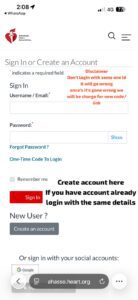
  1. Open the AHA eLearning portal (elearning.heart.org) and Sign In with your AHA account credentials.
  2. If you don’t have an account, choose Create Account and register using a valid email.

heartcode bls course in hyderabad heartcode bls course in hyderabad

Locate the course

  1. After signing in, go to My Courses (or the Dashboard).
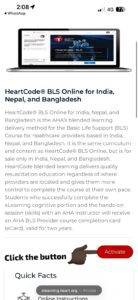
  2. If you were given an access/activation key, click Activate Key (or “Enroll”/“Redeem Key”) and paste the key to add HeartCode BLS to your courses.
  3. Once enrolled, the course tile for HeartCode® BLS Online will appear in My Courses — click it to launch.

heartcode bls course in hyderabad

Start the module (you’ll see the page shown in the screenshots)

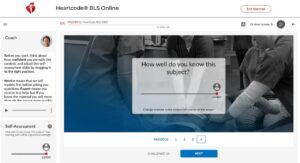
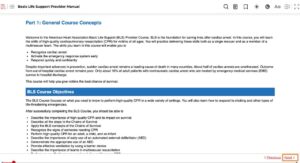
  1. After launching the course you’ll see the title bar “HeartCode® BLS Online” across the top and the course interface pictured in your images.
  2. The top progress line shows 0% initially and estimated time remaining (example: “~1h 29min left”).

heartcode bls course in hyderabad

heartcode bls course in hyderabad

Adjust Self-Assessment (left column)
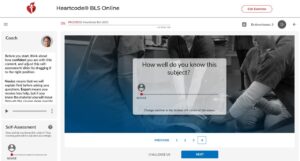
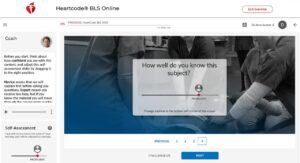
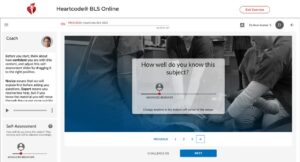
  1. In the Self-Assessment area at the bottom-left, drag the slider to indicate how well you know the subject (Novice → Competent → Expert).
  2. This customizes the adaptive learning path. (Your screenshots show the slider moving from NOVICE → ADVANCED BEGINNER → COMPETENT.)

heartcode bls course in hyderabad

heartcode bls course in hyderabad

heartcode bls course in hyderabad

heartcode bls course in hyderabad

heartcode bls course in hyderabad

Use the Coach audio (left panel)

  1. The Coach widget (top-left) has an audio control. Press the play icon to hear instructions / narration if you prefer audio.
  2. The vertical ellipsis icon (⋮) may offer more options (e.g., closed captions or additional settings).

Navigate the course pages

  1. In the main content area you’ll see the current learning screen (large central panel) with page numbers (1–4) and a NEXT button beneath it.
  2. Use the NEXT button to advance through the module. You may also click the page numbers directly to jump between pages if allowed.

heartcode bls course in hyderabad

Complete interactive questions and simulations

  1. Answer any embedded questions, select options, and complete interactive tasks. The course is adaptive — your answers and the self-assessment change what material is shown next.

heartcode bls course in hyderabad

heartcode bls course in hyderabad

Watch pop-up help / onboarding (if present)

  1. Some screens include short explanatory overlays (as in your second screenshot with an overlay text). Read/close those panels to continue.

Track progress & time

  1. Watch the progress bar at the top — it updates as you finish content. The time estimate (e.g., “~1h 29min left”) helps you plan breaks.

heartcode bls course in hyderabad

Exit safely when needed

  1. Click Exit Exercise (top-right) if you need to leave the module. Most HeartCode courses save progress so you can resume later — confirm save prompts if they appear.

heartcode bls course in hyderabad

Print / save your online completion certificate

When you finish the online portion, download or print the online completion certificate from the course summary or My Courses. This is required to attend the instructor-led skills session.

heartcode bls course in hyderabad

Access Ebooks

heartcode bls course in hyderabad

heartcode bls course in hyderabad

heartcode bls course in hyderabad

Attend the skills session

Bring the online completion certificate to your instructor-led hands-on skills session. After successful skills verification, the instructor or the AHA system will issue the eCard (AHA completion card).